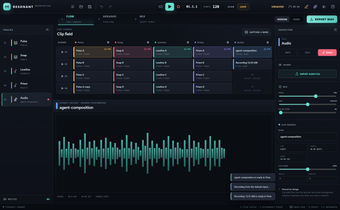
Local AI music studio with MCP agent co-production and mixer
Resonant, from Calesthio, is a local AI music production suite that converts text prompts into finished tracks within a DAW-style workflow. The app generates songs on-device and pairs a clip-launch workflow with an arranger and mixer for track finishing. It exposes an MCP server for AI agent collaboration and supports high-quality WAV export. Producers and developers who need private, agent-driven music creation find an integrated studio-oriented environment.
What tasks can you actually use it for?
The app functions as an on-device music studio that moves ideas to finished audio, supporting sampled-instrument playback and exportable WAV masters. Its internal pipeline accepts text prompts and produces arranged material plus stems that can be mixed and rendered without cloud services. Use cases include rapid idea sketching, demo vocals, multilingual songwriting, and single-seat production where keeping generated assets locally matters.
How accurate are the generated vocals and songwriting?
The built-in ACE-Step 1.5 vocal engine produces realistic vocal lines and supports multilingual songwriting across English, Mandarin, Hindi, Latin American Spanish, Korean, and Japanese. Output files carry no watermarks and the studio does not claim ownership of created assets, so generated stems and masters remain under the user's control. For complex lyric phrasing or live-performance polishing, additional human editing is advisable.
What hardware and inputs limit what it can do?
The core workstation runs on standard desktop hardware, but the optional ACE-Step 1.5 vocal generator requires an NVIDIA GPU with roughly 6–8 GB of VRAM for optimal performance. The app acts as an MCP server and accepts control from MCP-enabled clients such as Claude Desktop and Codex, so full agent-driven workflows depend on external AI clients that implement the protocol.
How does it fit into established production workflows?
The app adopts an Ableton Live-inspired clip launcher for on-the-fly experimentation, plus an arranger and mixer intended for finishing tracks in the same environment. It supports recording sampled instruments and provides WAV export for DAW handoff or distribution. As an open-source project from a developer already building agentic tools, the project embeds agent workflows into familiar studio patterns rather than isolating generative outputs in a separate sandbox.
Who should adopt it, and what to expect next
The tool is a pragmatic option for producers and developers who prioritize on-device AI co-production and agent-driven composition. Its local execution and MCP-based control suit private, automated workflows, yet the project is relatively new and actively evolving; teams that require a stable, unchanging toolchain should plan integration carefully. Pin releases and follow the change log for updates.